The Ultimate Guide to Creating 3D Kids Animation Song & Videos
Discover the easiest AI workflow to create vibrant 3D kids animation videos from scratch—no 3D modeling or animation experience needed.
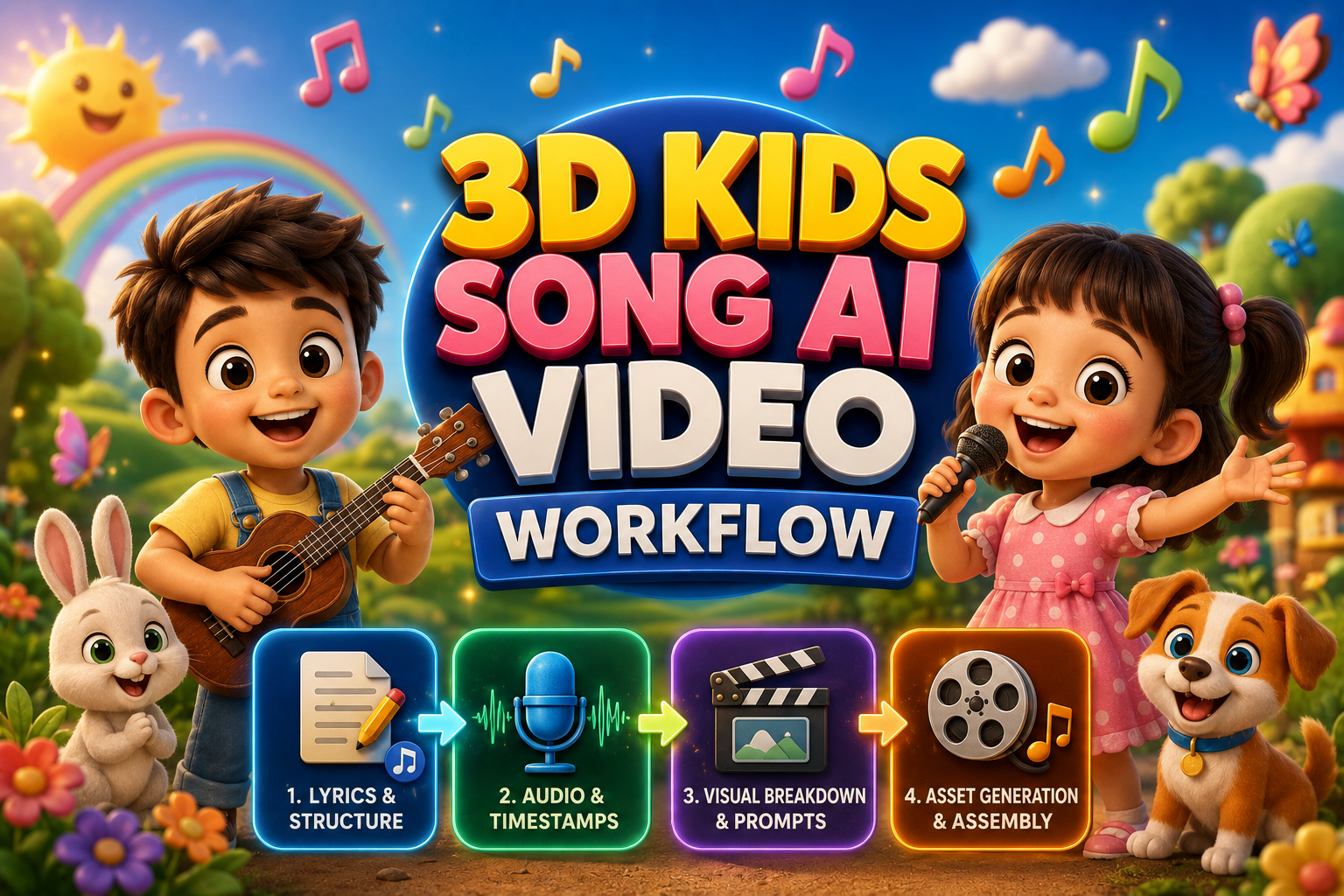
The Secret to Creating 3D Kids Songs with AI (Without Complex 3D Software)
Have you ever wondered how top children's YouTube channels pull in millions—sometimes billions—of views with simple, catchy nursery rhymes?
Young children are naturally drawn to bright colors, bouncy songs, and lovable, smooth 3D animated characters like the ones featured in Cocomelon, Little Baby Bum, or Pixar animated feature films. However, historically, creating even a brief 3-minute 3D animation was completely out of reach for independent creators. It required months of intensive labor, expensive multi-thousand-dollar workstations, rendering farms, and a full team of specialized 3D artists skilled in rigging, keyframing, texturing, and studio lighting.
Today, modern generative AI tools have fundamentally democratized high-end 3D animation. You can now design, compose, animate, and produce a professional-grade 3D kids' song video directly from your personal computer—without touching complex software like Blender, Maya, or Unreal Engine.
While creating an isolated AI video clip is easy, the true challenge lies in maintaining consistent character design across multiple scenes and aligning motion perfectly to the cadence of the background music.
This comprehensive guide reveals a complete, step-by-step production framework to write scripts, synthesize studio-quality children's music, maintain character continuity, extract precise audio timestamps, and edit everything into a high-retention video ready for YouTube monetization.
Traditional 3D Animation vs. Modern AI-Powered Production
To understand why generative AI is transforming content creation for young audiences, consider how modern AI tools streamline the conventional production line:
| Production Stage | Traditional 3D Workflow | Modern AI-Powered Workflow |
|---|---|---|
| 3D Modeling & Rigging | Weeks of manual mesh modeling, bone rigging, and weight painting in Maya/Blender. | Instant text-to-3D character design sheets generated on isolated white backgrounds. |
| Music Composition | Hiring audio engineers, session vocalists, and musical arrangers ($500–$2,000/track). | Automated studio-quality music generation via Suno AI or Flow Music in seconds. |
| Animation & Keyframing | Frame-by-frame movement tracking, facial blend shapes, and secondary physics setup. | AI image-to-video motion control via Higgsfield, Google Flow, or Luma Dream Machine. |
| Rendering Time | Hours or days of rendering frame sequences using expensive cloud GPU farms. | Fast cloud rendering completed in under 2–3 minutes per 10-second scene. |
| Production Speed | 3 to 6 weeks per 3-minute video. | 2 to 4 hours total production time for a complete video. |
The 4-Step Production Blueprint
Below is the complete architectural roadmap from initial concept to a published, high-definition video:
┌─────────────────────────────────────────────────────────────┐
│  STEP 1: Write a Catchy, Educational Kids Song Script       │
│  (Tools: ChatGPT / Claude / Gemini)                         │
└──────────────────────────────┬──────────────────────────────┘
                               │
                               ▼
┌─────────────────────────────────────────────────────────────┐
│  STEP 2: Turn Lyrics into a Studio-Quality Song             │
│  (Tools: Suno AI / Flow Music)                              │
└──────────────────────────────┬──────────────────────────────┘
                               │
                               ▼
┌─────────────────────────────────────────────────────────────┐
│  STEP 3: Grab Exact Lyric Timestamps for Perfect Sync       │
│  (Tool: Google AI Studio - Gemini Model)                    │
└──────────────────────────────┬──────────────────────────────┘
                               │
                               ▼
┌─────────────────────────────────────────────────────────────┐
│  STEP 4: Generate 3D Clips & Edit the Final Video           │
│  (Visuals: Higgsfield / Flow | Editing: CapCut / DaVinci)   │
└──────────────────────────────┴──────────────────────────────┘
Step 1: Write a Catchy, Educational Kids Song
Every viral children's song relies on a foundational rule of early childhood development: predictable repetition, simple phonetics, and uplifting rhythms. Toddlers learn best through structured repetition that helps them anticipate words and dance along.
When prompting Large Language Models (LLMs) to write nursery lyrics, structural metatags are critical. Music generation algorithms rely on specific tags—such as [Intro], [Verse], [Chorus], [Bridge], and vocal cues like (Giggle) or [Clap]—to determine tempo switches and vocal rhythm.
Core Writing Principles:
- Select High-Engagement Themes: Focus on preschool concepts such as colors, geometric shapes, counting 1 to 10, farm animal sounds, brushing teeth, or clean-up routines.
- Keep Sentence Structure Short: Limit lines to 4–7 simple words to make singing along effortless.
- Design Sticky Choruses: Repeat the main hook at least three times across the length of the track.
Use the master structured prompt template below to generate production-ready song lyrics:
{
  "task": "Generate Kids Educational Song Lyrics",
  "song_parameters": {
    "topic": "Colors, Shapes, Numbers, Good Habits",
    "target_audience": "2-5 years old toddlers",
    "style_genre": "Cocomelon style, upbeat nursery rhyme, catchy, joyful, cheerful acoustic rhythm",
    "duration_minutes": 5,
    "structure": "Intro, Verses, Repeated Chorus, Bridge, Outro"
  },
  "instructions": {
    "language": "Simple, rhythmic, easy-to-sing English words suitable for young kids",
    "suno_tags": "Include tags like [Intro], [Verse], [Chorus], [Bridge], [Outro], and vocal cues like (Giggle), (Clap)",
    "output_requirement": "Provide complete lyrics from 0:00 to 5:00 with exact timestamps and section labels"
  }
}
Step 2: Generate Studio-Quality Music and Vocals
With your lyrics fully formatted, the next stage is transforming written text into high-energy audio tracks featuring clear vocal performances.
Best AI Music Platforms:
- Suno AI (v3.5 / v4): Excellent at handling nursery rhyme melodies, child-friendly female or ensemble vocals, and acoustic instrumentation.
- Flow Music: Strong at generating modern electronic pop nursery beats with clean spatial balance.
Recommended Style Prompts:
"Upbeat acoustic ukulele, Cocomelon style, alegre, vibrant nursery rhyme, cheerful toddler vocal, warm bass, high energy, simple acoustic guitar, 120 bpm"
Audio Optimization Rules:
- Retain All Structural Bracket Tags: Do not remove tags like
[Upbeat Ukulele Intro]or[Chorus]when pasting text into Suno. The system reads these markers to sequence musical breaks and vocal entrances. - Generate Multiple Audio Variants: Generate 4 to 6 iterations. Listen closely for clear vocal articulation so toddlers can clearly distinguish individual words.
- Export Clean Uncompressed Audio: Download lossless WAV or high-bitrate MP3 files to preserve audio clarity during video editing.
Step 3: Extract Exact Timestamps for Perfect Video Sync
A frequent flaw in amateur AI animation videos is random, uncoordinated cuts where character actions do not align with spoken lyrics. Aligning visual events directly to specific words significantly increases audience retention.
Instead of manually scrubbing through timelines with a stopwatch, leverage multi-modal LLMs like Google AI Studio (Gemini) to analyze your uploaded audio track and automatically extract micro-timestamps for every spoken line.
Step-by-Step Timestamp Extraction Workflow:
- Open Google AI Studio and upload your exported song audio file (
.mp3or.wav). - Run the specialized extraction prompt provided below.
- Copy the output line-by-line timing breakdown into your project notes.
{
  "task": "Extract Exact Lyrics and Timestamps from Uploaded Audio File",
  "input": "Uploaded Kids Song Audio",
  "instructions": {
    "step_1": "Listen carefully to the audio and transcribe the exact lyrics sung in the track.",
    "step_2": "Identify the precise start and end timestamp for each sentence or musical line.",
    "step_3": "Break down the entire song into continuous segments without missing any time gap (including instrumental breaks).",
    "step_4": "Format the output clearly line-by-line so it can be passed to visual prompt generation."
  }
}
Step 4: Create Consistent 3D Characters and Scenes
Character drift—where an animated character's hair, clothing, body proportions, or facial structure changes unpredictably between shots—destroys viewer immersion.
To ensure complete visual consistency throughout your animation, implement a Modular Asset Strategy:
- Isolated Character Reference Sheets: Generate character designs rendered against a solid, neutral white background (
hex #FFFFFF). This establishes an unambiguous character baseline for video generators. - Clean Environment Background Plates: Generate 3D background environments (e.g., a brightly colored toddler playroom, a sunny park, or a colorful kitchen) without any characters inside.
- 10-Second Motion Scene Generation: Combine both the character sheet and the environment plate inside image-to-video tools (such as Higgsfield or Google Flow) while applying targeted camera movement prompts.
Pass your extracted lyric timestamps into this master prompt to generate complete image and video generation prompts:
{
  "task": "Generate 3D Visual Production Prompts for Animated Kids Song",
  "input_data": {
    "style": "3D Pixar / Cocomelon Animation Style",
    "target_video_duration": "Break into exact 10-second segments based on lyrics",
    "audio_breakdown_data": "[PASTE THE EXACT LYRICS AND TIMESTAMPS FROM GOOGLE AI STUDIO HERE]"
  },
  "rules_and_constraints": {
    "character_prompts": "Must be full body character sheets named clearly, isolated on a solid pure white background.",
    "environment_prompts": "Must be clean background scenes with NO human characters present.",
    "video_segment_prompts": "Break into exact continuous 10-second segments. For EVERY segment, explicitly list: 1) Required Character Reference Images (with Character Names) to attach, 2) Required Environment Background Image to attach, 3) Detailed Motion/Camera Video Prompt (16:9 aspect ratio, 3D Cocomelon style)."
  },
  "required_output_sections": [
    "1. Character Design Sheet Prompts (Pure White Background)",
    "2. Environment & Background Prompts (No Humans)",
    "3. Segment-by-Segment Video Generation Prompts (With Exact Image Reference List for Each Segment)"
  ]
}
The Video Assembly & Editing Workflow
Once your image assets and video clips are rendered, use this structured editing pipeline in CapCut, DaVinci Resolve, or Adobe Premiere Pro:
| Stage | Tool Options | Technical Action Items |
|---|---|---|
| 1. Asset Generation | Higgsfield / Google Flow | Render character sheets on white backgrounds alongside background plates. |
| 2. Motion Synthesis | Higgsfield / Google Flow / Luma | Input character + background reference images and apply 10-second camera motion prompts. |
| 3. Post-Production | CapCut / DaVinci Resolve | Align audio to track 1, set timeline markers, snap 10-second clips, generate animated subtitles, render. |
Editing & Retention Best Practices:
- Lock the Audio Track First: Place your master audio file on Track 1 and lock it immediately to prevent accidental timeline displacement.
- Set Visual Markers: Import your micro-timestamps from Step 3 as timeline markers. Snap video clips directly to these markers for perfect frame alignment.
- Apply Animated Karaoke Subtitles: Young viewers and parents benefit from dynamic subtitles. CapCut offers automated animated text templates that highlight words as they are sung.
- Avoid Flashy Camera Transitions: Stick to straight cuts between scenes. Excessive zooms, wipes, or spin transitions distract from character performance.
- Export Format: Export in 16:9 widescreen format at 1080p (1920x1080) or 4K resolution at 30 FPS or 60 FPS for optimal television playback.
Key Takeaways & Frequently Asked Questions
Key Takeaways:
- No 3D Software Required: Modern generative AI pipelines replace complex modeling, rigging, and keyframing software.
- Character Continuity is Managed via Reference Sheets: Generating isolated character sheets on solid white backgrounds (
#FFFFFF) eliminates character drift across video scenes. - Audio-Driven Visual Editing: Using multi-modal AI like Gemini to extract exact micro-timestamps ensures video cuts hit every beat of the song.
- Dynamic Subtitles Boost Retention: Animated, bouncing karaoke captions keep toddlers and parents engaged longer.
Frequently Asked Questions (FAQ):
Q1: Can I monetize 3D AI-generated kids song channels on YouTube?
Yes, AI-generated kids' animation channels can be monetized through the YouTube Partner Program, provided your content offers original educational value, original songwriting, and high production effort. Avoid publishing repetitive, auto-generated low-effort content without distinct educational themes.
Q2: How do I fix character drift if the AI slightly changes my character's clothing?
To minimize character drift, always attach your initial white-background character reference sheet along with the background plate in image-to-video engines. Keep character descriptions brief and identical across all text prompts.
Q3: Which video generator works best for 3D Pixar-style movement?
Higgsfield, Google Flow, and Luma Dream Machine excel at rendering smooth, organic 3D Pixar-style movements, expressive character gestures, and stable lighting.
Q4: How long does it take to complete a full 3-minute video using this AI workflow?
With structured prompts and pre-rendered assets, a full 3-minute 3D animated nursery video can be scripted, composed, rendered, and edited in approximately 2 to 4 hours.
Related Articles
Unlock the Secrets to Recreating Viral Motion Graphics with AI
Discover how to recreate viral motion graphics reels in minutes using AI, multimodal analysis, and next-gen video diffusion models.
How to Create 3D Cartoon Story Videos with AI For FREE (Full Workflow & Prompts)
Master the complete step-by-step pipeline to create viral Pixar-style 3D animated kids stories using Google Gemini, Google AI Studio, and Google Flow with zero budget.
Mastering Realistic AI Video Creation with Google Flow
Learn how to create a realistic AI video using Google Flow, from generating a photorealistic image to adding dialogue and gestures, all in one seamless workflow.