Master the Art of AI-Driven 3D Kids Song Production: A Step-by-Step Guide
Discover how to leverage modern AI tools to create high-quality 3D animated kids' songs in a structured, modular workflow, inspired by Cocomelon and Pixar.
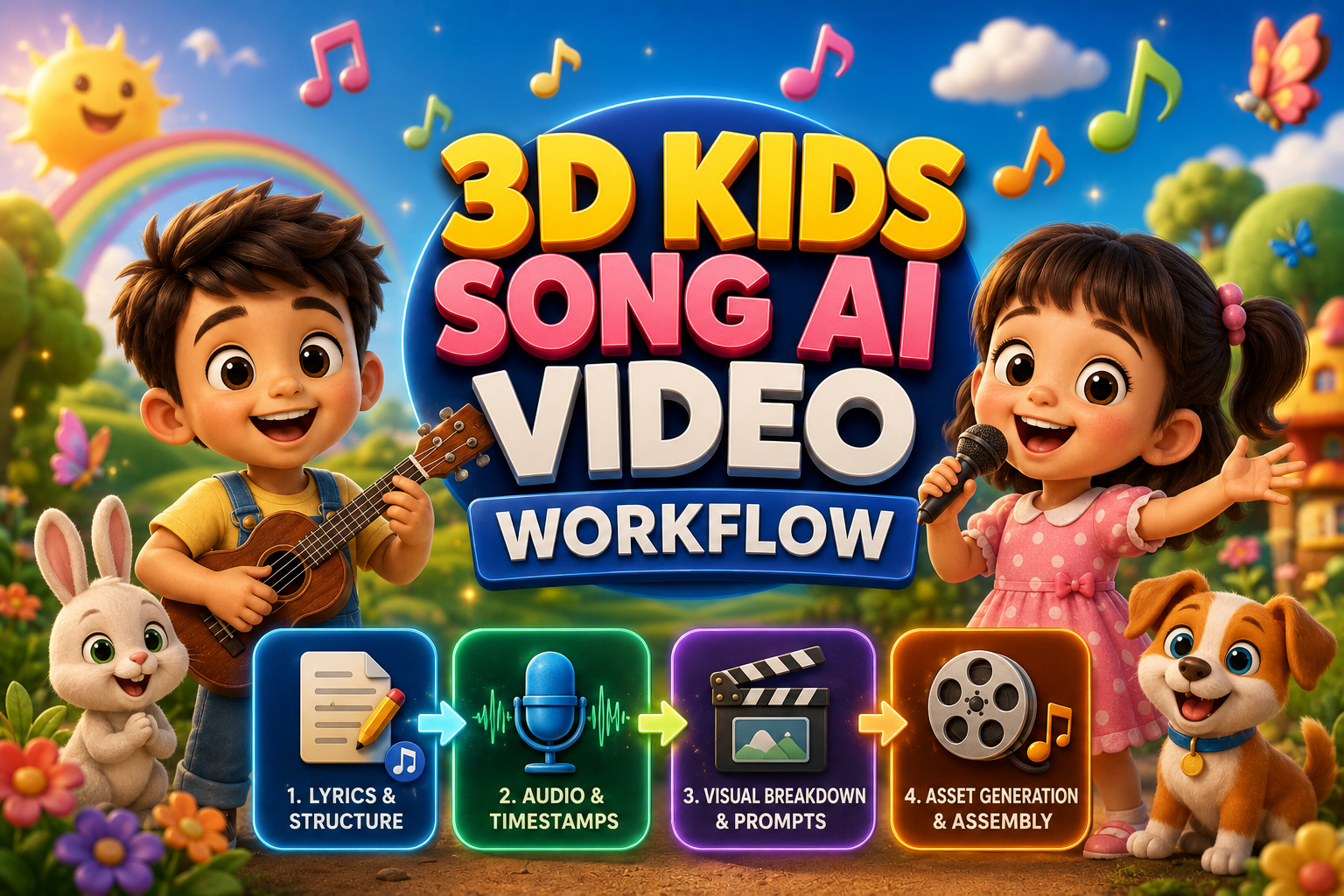

Complete 3D Kids Song AI Video Production Workflow
Producing animated 3D children's videos traditionally required dedicated animation studios, complex 3D rigging, and months of manual productionspan_1span_1. Modern generative AI tools make it possible to script, voice, animate, and assemble a full 3D animated nursery rhyme using a structured, modular workflowspan_2span_2.
This guide breaks down the full four-step pipeline to create high-retention, Cocomelon/Pixar-style educational kids' songs with synchronized audio and consistent visual assetsspan_3span_3.
The 4-Stage Production Architecture
- Lyrics & Structure Generationspan_4span_4
- Audio Generation & Exact Timestamp Extractionspan_5span_5
- 3D Visual Breakdown & Scene Prompt Pipelinespan_6span_6
- Asset Generation & Timeline Assemblyspan_7span_7
Step 1: Song Lyrics & Structure Generationspan_8span_8
Before generating audio, produce a structured educational script tailored for AI music generators such as Sunospan_9span_9. The script must include section markers, timing cues, and vocal directionsspan_10span_10.
- Tools: ChatGPT / Claude / Geminispan_11span_11
- Objective: Create educational, rhythmically structured lyrics tailored for AI audio enginesspan_12span_12.
Option A: Structured JSON Promptspan_13span_13
Option B: Direct Descriptive Promptspan_14span_14
Step 2: Audio Analysis & Exact Timestamp Extractionspan_15span_15
After producing the master audio track in your chosen music generation tool, you must extract exact start and end timestamps for every linespan_16span_16. This ensures visual cuts match the vocal delivery precisely on the editing timelinespan_17span_17.
- Tool: Google AI Studio (Gemini multimodal model)span_18span_18
- Objective: Extract frame-accurate timestamps matching the generated audio trackspan_19span_19.
Option A: Quick Extraction Promptspan_20span_20
Option B: Advanced JSON Analysis Promptspan_21span_21
Step 3: Visual Breakdown & Segment Prompt Generationspan_22span_22
Maintaining consistent 3D characters across multiple video shots requires separating character references, environment references, and motion promptsspan_23span_23.
- Tools: ChatGPT / Geminispan_24span_24
- Objective: Generate asset turnaround sheets and 10-second continuous video promptsspan_25span_25.
Option A: Master Generation Prompt (JSON)span_26span_26
Option B: Descriptive Promptspan_27span_27
Step 4: Asset Generation, Video Rendering & Assembly Pipelinespan_28span_28
Once your prompts are generated, execute the visual assets and assemble the final render using the production pipeline belowspan_29span_29:
| Phase | Recommended Tools | Key Execution Actions |
|---|---|---|
| 1. Asset Generation | Higgsfield / Google Flow | Generate full-body character reference sheets on pure white backgrounds and clean environment backgrounds with no subjects. |
| 2. Video Clip Generation | Higgsfield / Google Flow | Upload Character + Background reference images per 10-second segment; execute the designated motion prompt. |
| 3. Final Post-Production | DaVinci Resolve / CapCut / Premiere |
|
Post-Production Assembly Checklistspan_30span_30
- Audio Alignment: Place the master vocal track on Track A1 of your editing timelinespan_31span_31.
- Clip Synchronization: Snap each 10-second generated clip to the markers extracted during Step 2span_32span_32.
- Subtitles & Overlays: Add synchronized lyric subtitles to boost educational value and viewer engagementspan_33span_33.
- Color & Export: Apply subtle global contrast adjustments to unify clip tones, then export in 1080p 16:9 resolutionspan_34span_34.