Mastering 3D Kids Animation with AI: A Complete Step-by-Step Guide
Unlock the secrets to creating engaging 3D kids animation videos using AI, with our comprehensive guide to high-retention content production.
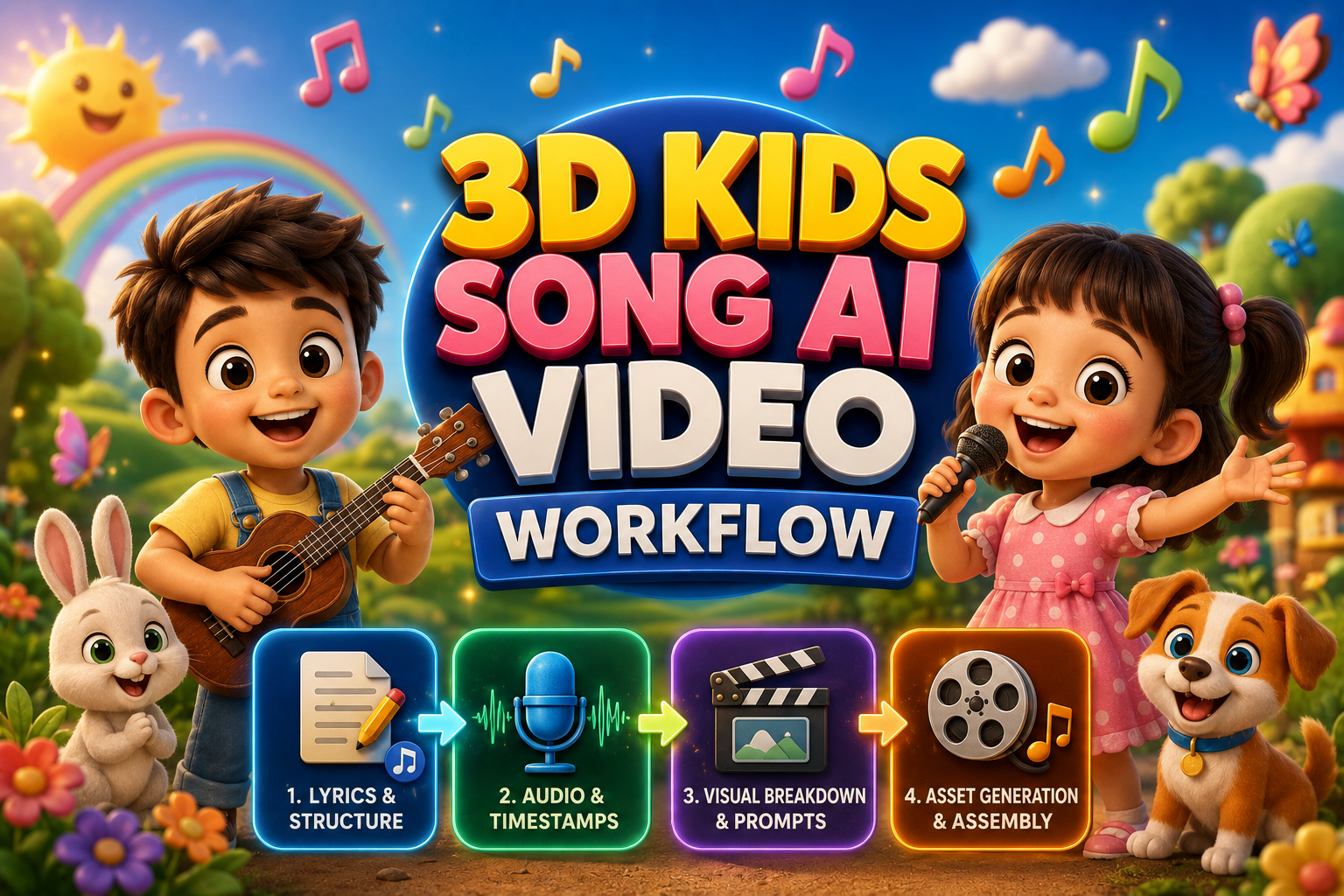
The 4-Stage AI Video Production Architecture
To maintain consistency across an entire five-minute animated production, work in four sequential, data-driven stages:
┌─────────────────────────────────────────────────────────────┐
│  STAGE 1: Educational Lyrics & Musical Structure Design     │
│  (Primary Engines: ChatGPT / Claude / Gemini)               │
└──────────────────────────────┬──────────────────────────────┘
                               │
                               ▼
┌─────────────────────────────────────────────────────────────┐
│  STAGE 2: Audio Synthesis & Studio-Grade Vocal Generation   │
│  (Primary Engines: Suno AI / Flow Music)                    │
└──────────────────────────────┬──────────────────────────────┘
                               │
                               ▼
┌─────────────────────────────────────────────────────────────┐
│  STAGE 3: Audio Analysis & Millisecond Timestamp Extraction │
│  (Primary Engine: Google AI Studio - Gemini Model)          │
└──────────────────────────────┬──────────────────────────────┘
                               │
                               ▼
┌─────────────────────────────────────────────────────────────┐
│  STAGE 4: Visual Breakdown, Asset Generation & Assembly     │
│  (Visuals: Higgsfield / Google Flow | NLE: DaVinci/CapCut)  │
└─────────────────────────────────────────────────────────────┘
Stage 1: Educational Lyrics & Song Structure Generation
The foundation of any successful children's animated project is an educational, catchy, and rhythmically structured script. AI audio generation models require precise structural tags (such as verse, chorus, bridge, and vocal expression markers) to produce coherent melodies with clear pronunciation.
Core Production Objectives
- Target early childhood development themes: colors, basic shapes, counting numbers, and positive social habits.
- Format lyrics with rhythmic pacing suitable for toddlers aged 2 to 5 years.
- Embed explicit audio synthesis tags and dynamic performance cues (e.g., clapping sounds, giggles, acoustic instrument cues).
Stage 2: Studio Audio Generation & Vocal Synthesis
Once your structured lyrics and tag markers are compiled, generate the master audio track using AI music synthesis platforms.
Primary Tools
- Suno AI
- Flow Music
Production Guidelines
-
Full Tag Retention: When pasting your script into the custom audio generation interface, retain all structural headers (e.g.,
[Upbeat Ukulele Intro],[Verse 1],[Chorus],[Catchy Whistling Solo],[Outro]). These brackets guide the underlying neural network's arrangement and pacing. -
Multiple Seed Iterations: Always generate at least 4 to 6 melodic variations. Evaluate each take for vocal clarity, syllable pacing, and acoustic warmth.
-
Master Export: Select the iteration with the cleanest vocal pronunciation and export the uncompressed high-bitrate audio file for timeline editing.
Stage 3: Audio Analysis & Millisecond Timestamp Extraction
In animated productions, video clips must match musical lines precisely. Cutting scenes randomly without aligning to song phrases breaks viewer immersion and lowers watch time. Use Google AI Studio's multimodal capabilities to analyze the audio file directly and extract accurate timestamps.
Primary Tool
- Google AI Studio (Gemini Model)
Operational Workflow
-
Open Google AI Studio and upload your exported full-length audio file.
-
Paste the automated timestamp extraction prompt into the chat window.
-
Receive a line-by-line transcription paired with precise start and finish millisecond marks.
Stage 4: Visual Breakdown & Segment Prompt Generation
The most common challenge in AI video creation is character drift: characters changing facial features, clothing, or hair colors between consecutive shots.
To solve this, implement a modular image-to-video workflow:
-
Isolated Character Turnaround Sheets: Generate full-body character reference models isolated against clean, pure white backgrounds.
-
Isolated Environment Plates: Generate clean background scenes completely empty of human or animal characters.
-
Continuous 10-Second Generation Prompts: Combine the character reference and background plate with a specific motion prompt for each 10-second segment.
Visual Asset Generation & Assembly Pipeline
With your character sheets, background plates, and motion prompts ready, proceed through the execution pipeline:
| Production Phase | Recommended Tools | Key Actions & Execution Checklist |
|---|---|---|
| 1. Asset Generation | Higgsfield / Google Flow | Generate full-body character turnaround reference sheets on pure white backgrounds and clean environment plates with zero subjects. |
| 2. Video Clip Generation | Higgsfield / Google Flow | Upload the character sheet and environment reference plate for each 10-second segment; execute the designated camera and motion prompt to ensure visual continuity. |
| 3. Final Post-Production | DaVinci Resolve / CapCut / Premiere Pro | • Place master audio on Track A1. • Align and edit generated 10-second video clips to timeline markers. • Add styled, animated karaoke subtitles. • Apply a global color grade and export in 1080p/4K at 60fps. |
Best Practices for Post-Production Assembly
-
Timeline Setup: Create a standard 16:9 widescreen timeline at 60 frames per second. Drop your master audio on Track A1 and lock the track to prevent accidental shifts.
-
Marker Snapping: Import your extracted timestamp list from Stage 3 and place timeline markers at each phrase boundary. Snap your generated 10-second video clips to these markers.
-
Pacing and Transitions: Use simple, clean jump cuts or gentle cross-dissolves on strong downbeats. Avoid overly busy transitions that distract from the main character actions.
-
Subtitles & Visual Callouts: Add colorful, bouncing karaoke-style subtitles. Highlighting each word as it is sung improves engagement and reading comprehension for young viewers.
-
Quality Control & Export: Check that lighting, color saturation, and character features remain uniform across every cut, then export your final video at high bitrate.
Related Articles
How to Create 3D Cartoon Story Videos with AI For FREE (Full Workflow & Prompts)
Master the complete step-by-step pipeline to create viral Pixar-style 3D animated kids stories using Google Gemini, Google AI Studio, and Google Flow with zero budget.
Mastering Realistic AI Video Creation with Google Flow
Learn how to create a realistic AI video using Google Flow, from generating a photorealistic image to adding dialogue and gestures, all in one seamless workflow.

How to Make Money with AI Videos in 2026 (Beginner's Guide)
Complete beginner's guide to making money with AI video generation in 2026 across faceless channels, freelancing, and indie AI filmmaking.